Pages

Showing posts with label Blogging. Show all posts

Saturday, February 10, 2007

All New Fisheye Script!

Fisheye is not a new script, It is been used in many websites and I am sure even you might have notice. Its simple, effective and looks awesome. OK lets not deviate and jump into the topic.

Place the following javascript in a external file and place it in your head part.

Download the fisheye.js from HERE and upload it to web and refer in the header part.


Paste the following code in your CSS (obv in head section)


Now you need to just include your lines in between


and the effect will be like this:

Place your cursor on these lines

Empty streets Empty house
Hole inside my heart,
I'm all alone,
Rooms are getting smaller,

blah blah! have fun :)

Monday, February 5, 2007

How to add your site to google search engine

Search engines play substantial role in driving traffic to your site. For your site to get listed in Google it must first be crawled by a Googlebot.
This is basically a computer program that accesses your page reads it, and will rate and categorise it within Google’s database of webpages.
The first thing I suggest is to visit http://www.google.com/addurl/ and add your site to the list and provide all the details if necessary.

The next thing to note is that Google’s crawlers regularly crawl the internet and when they find a page they read all of the links off of that page and add them also to the crawl list. So the more people that link to your site, the more chance of you site being crawled. In the near future I will be setting up a link exchange for users who have pages relevant to mine to exchange links with me

Another way of adding yourself on to the Google crawl list and helping the Googlebots to find your website is to create a Google Site Map This is undoubtedly the best method and needs little patience, Let us discuss this in detail.

  1. Visit the following link https://www.google.com/webmasters/tools/siteoverview?hl=en_GB sign-in with you gmail id. Next add your site url eg:http://sordid-humor.blogspot.com
  2. Then you'll go to the page which appears like the following image.
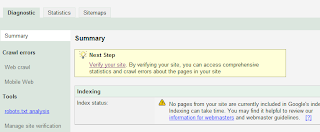
click on "verify your site"
3. You will goto another page and will be asked to "choose the verification method", select "Add a META tag", then you'll be given an unique code, copy that in head part of your html and "save the template".
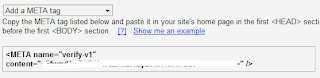
and click on verify.
Now as your done with verification part, let us proceed and see how to add to add the site map of your blog or site.

  1. Click on the first image and see, you'll be having three buttons referred as Diagnostics, Statistics and Sitemaps. Click on the Sitemaps and there you will fine a link called "Add a Sitemap" click on that.
  2. Youll proceed to new page, where you are asked to choose the type of your site map. There select "Add General Web Sitemap".
  3. Now this is tricky part, If your using any hosted web then you gotta build xml sitemap with the help of site map builders and place the link but if you are using blogger then its simple. You need to enter your atom.xml eg:http://sordid-humor.blogspot.com/atom.xml.

Thats it! wait for some days and you'll see your site in the google search engine.

Note: If you want google to update your site quickly then better try commenting in other blogs example mine :p, and increase your traffic.

Sunday, January 21, 2007

Add-ons for bloggers

Blogging with firefox is damn easy, the reason is simple!. There are many eminent add-ons for blogging in firefox. I have installed yesterday and just wanna share them. They should make blogging facile and effortless.

Navigate through the following links:

  • Highlight

    • Highlight lets you grab anything on the web you think is news. One click gets your story started, and connects......readmor
  • Smiley Xtra

    • Insert smilies from an online database into forum posts, blogs and more! .... readmore
  • PictureThis

    • Pull up pictures of any word or words you highlight on a

      webpage.... readmore
  • Adsense Notifier

    • Displays your Adsense earnings on the statusbar.... readmore
  • El Jay Icon Maker

    • El Jay icon maker allows you to right click on any image and create an icon for use with livejournal.com. There are two...... readmore
  • CLICK! by snapshot.jkn.com

    • Take a snapshot of any web page. Powered by snapshot.jkn.com

      The dynamic nature of the web is one of its greatest strengths, but it can be frustrating when you link to a web page only to have it change on you.... readmore
  • Farkode

    • Farkode provides a right-click menu in Firefox to simplify adding HTML (image tags, hyperlinks, font fomatting, etc.) to comments on the Fark.com and TotalFark.com websites.... readmore
  • Live Writerfox

    • Blog it from Windows Live Writer.
      Windows Live Writer is a new desktop application for composing blog posts to your blog service.
      It blogs a page or selected text to Windows Live Writer.
      To use it you need to have Windows Live Writer installed on your machine.

Friday, January 19, 2007

Rounders template remodeled

First I would like to appreciate the author of imessengr.com for his splendid work of converting a 2-columned rounders template to good looking 3-columned with many extra hacks added to it.
In the process he has forgotten some minimal things. Let us see what are those and how to fix them.

Maximize the image to view it completely.

  1. Unwanted side-top bar with unique color, looking weird doesn't?
  2. Right sidebar has got the dotted border well placed.
  3. Where as its missing in the left sidebar.
Let us see how to fix them step by step.

1. Removing the unwanted side-top bar.

Find and delete the selected region of the template as shown below


and you'll not fine that unique bar again.

2. Adding dotted border to the left sidebar.

Now as we have deleted the side-top bar its unnecessary to have the css for it. So better copy the same css of right sidebar(which has dotted border) and change the id to sidebar2 to match the id of sidebar code which is written for it in the main block. Is it confusing? Then better go for another option, just change the id's which i have selected in the image to sidebar2. That is change it from sidebartop to sidebar2.


Now save the template and view the blog. If your still finding it burdensome then better download this remodeled template from here (right click and save link as).

If any doubts please comment.